How you feel shapes your exercise training minutes.
Your comeback
Trainingthatadapts tohowyoufeel.
Most apps hand you the same plan whether you slept badly, tweaked a
shoulder, or feel unstoppable. This one
asks first.
A training app that works around a sore shoulder, a cranky knee or a bad
back. It asks how you feel, writes today’s session around your
answer, and stops when something needs a professional.
So — how did you wake up?
Your answer stays in this tab. No analytics, no cookies, no account —
nothing about you leaves this page.
Scroll
The one rule
The red point is discomfort. It never fades.
Most apps make your discomfort look smaller to keep you motivated. We
show it exactly as you report it. The red point only changes when you say
it has, and your training adapts around it.
If what you report looks like it needs a doctor or a physical therapist,
the app stops and says so — no session that day.
The third way
Most people push through it and stall. Others
stop and lose ground. A third way: slow down,
keep building, and come back with more
confidence.
The shape of it
Something went wrong. That is where this starts.
Most plans aim at getting you back — and settle for a new normal below it.
The work is the climb, paced by what your body feels.
The target is above the new normal, not back to it.
An illustration of the approach, not a prediction of your results.
Why I built it — Launched in 2024
“
I injured my back, my neck, and my hip. I was told to
expect a new normal, or surgery: no sport, no lifting.
I didn’t want a new normal.
I didn’t want surgery either — that’s
my call, and yours is yours. What nobody helped with was the
part after: getting back to training, around a body that felt different
every day.
So I built it. My comeback.
Five phases
You do not move up because time passed.
Phase 1 · Protect
Settle it down
Rebuild the basics without stirring up whatever is sore.
14 training daysdiscomfort trendhonest check-ins
Phase 2 · Reload
Put the weight back
Add weight and effort back slowly, checking after every session how you handled it.
days at 3 or underreadiness holding
Phase 3 · Rebuild
Real strength work
Strength work, built on a base that has proven itself.
movement rangeno flare-ups
Phase 4 · Perform
Your sport, not a gym
Power, speed and the movements your sport actually asks for.
both sides eveneffort handled well
Phase 5 · Elite
Stay there on purpose
Training at full tilt, with the work that keeps you there instead of hoping you stay lucky.
0/10 at rest95% even side to sidefull range
Journeys
Start where you actually are.
Two journeys,
each with its own checks and its own program. Start with one, and add
the other once you pass your first phase check-in.
Comeback
For training around something that’s been
bothering you. Five phases, built to keep you moving
rather than waiting it out.
Desk Reset
For bodies shaped by a chair. Four
phases of undoing what sitting all day does to you —
and building back the strength it quietly takes.
The payoff
One answer. A different session.
67Drive
Finish every set.
Your readiness comes from a twenty-second morning check-in. It is what
today’s session is built from.
Today's sessionAS PLANNED
Glute bridge
3 × 10
Split squat
3 × 8 each side
Row
3 × 10
Dead bug
3 × 8 each side
Steady morning — the plan stands. Log how it went at the end and
tomorrow starts from that.
The feedback loop
It asks. Then it actually changes.
Four moments. The
check-ins feed the next program it writes; the phase review tells us
what to build. Answer them honestly and the sessions get more like you.
01
Morning
How you slept, how sore you are, what the day has in it. Twenty
seconds, and today’s load is set from it.
02
Session
After a session, how it went: discomfort, energy, effort and how
you feel now. A movement you keep skipping stops turning up.
03
Feeling
Once a day, whenever you like: how you feel, and where, on a body
picture. If what you report needs a professional, the app says so.
04
Phase review
Once a phase, how it went and what else helped. That one tells us
what to build next.
Every check-in feeds the next program.
A look inside
Four small things you’ll notice.
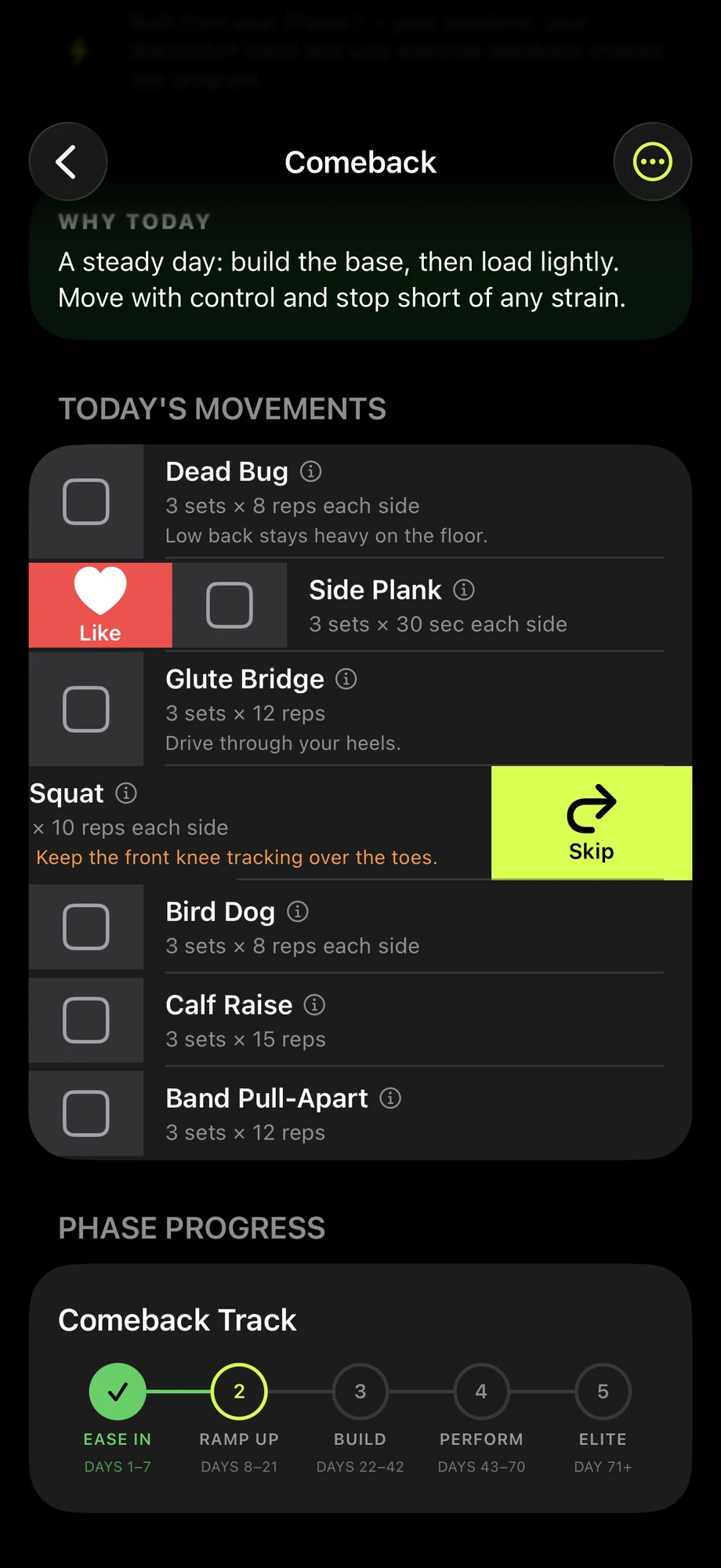
Shape it as you go
Swipe on anything that is not working.
Swipe right on a movement you want more of; swipe left to skip one,
and say why if you like. Both reach the coach that writes your
next session.
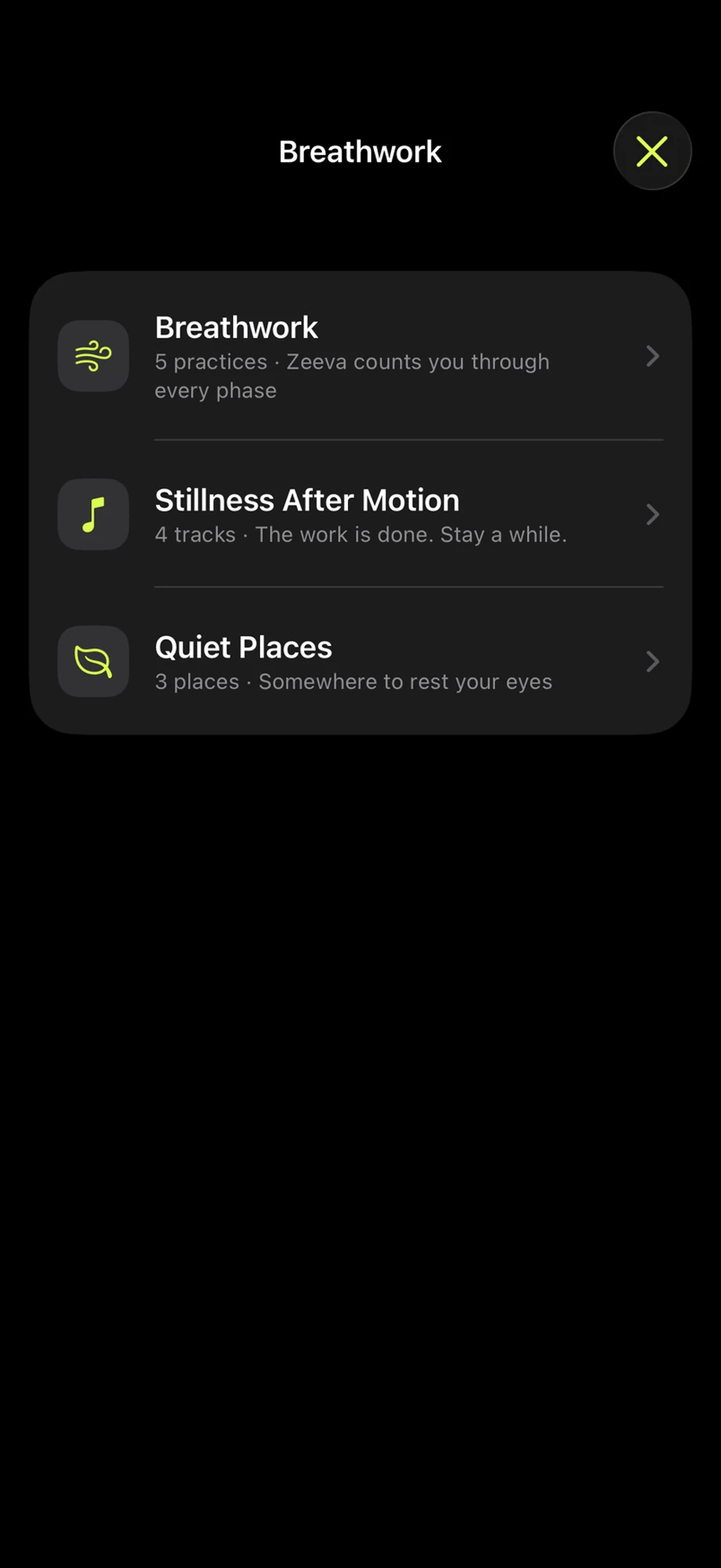
Between sessions
The training is not the whole of it.
Five breathing practices, four tracks to sit still to, and three
quiet places — a forest, a tide, a fog — for the
minutes after a hard set.
Every tester has all of it — nothing here is
held back behind a tier.
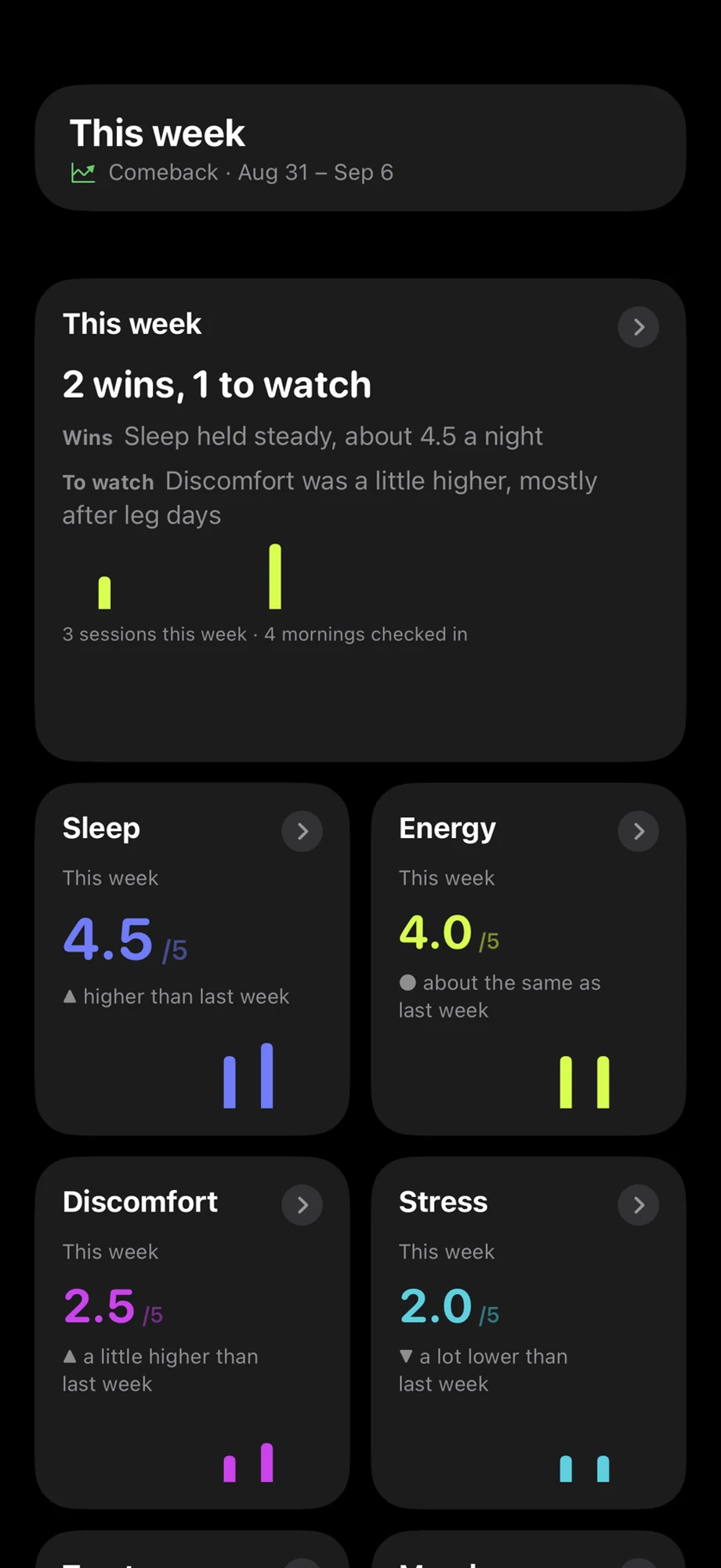
See the pattern
Everything it read, shown back to you.
Discomfort, readiness, sleep, the sessions you finished — as a trend
rather than a number. It shows you what it is reading, so you can
tell it when it has you wrong.
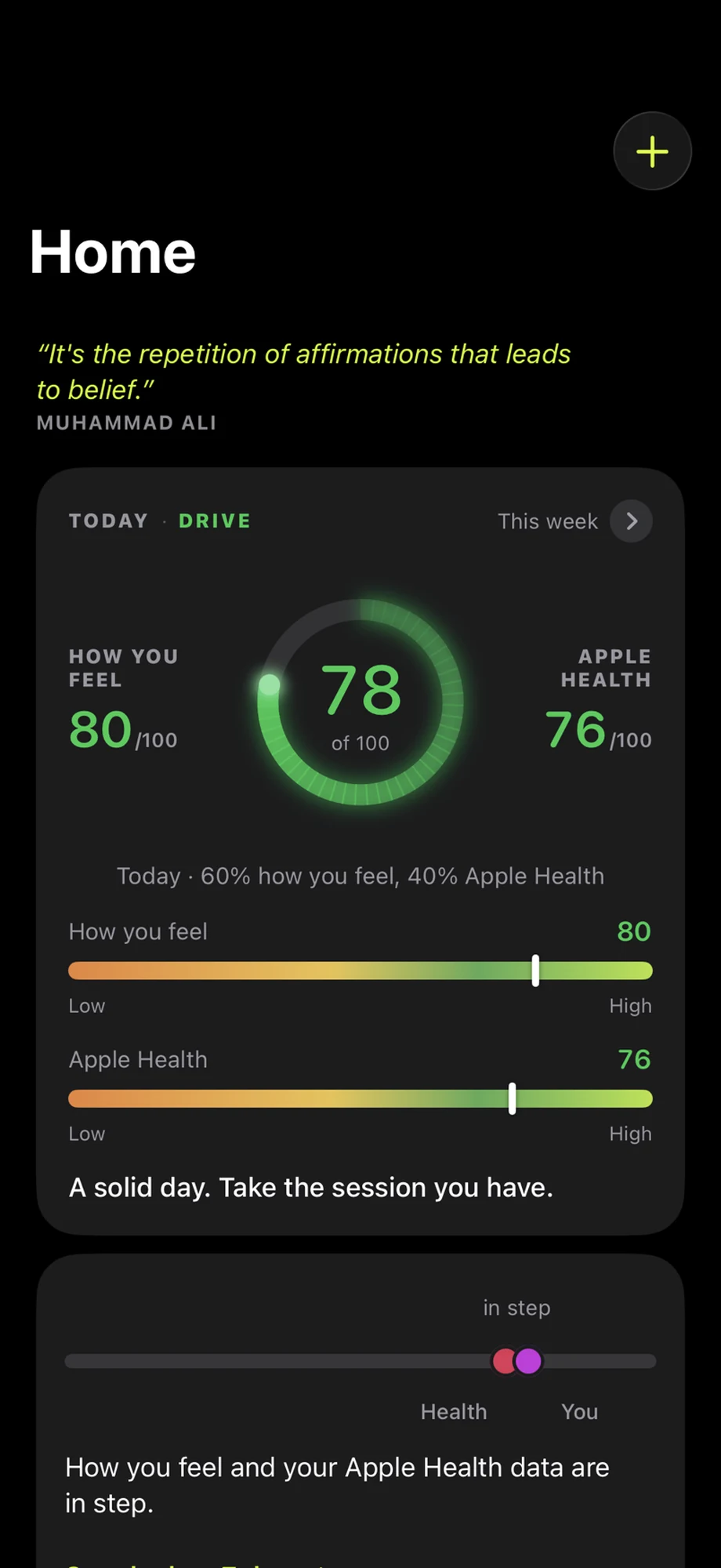
Beside Apple Health
How you feel, next to your Apple Health number.
Your check-in and your Apple Health reading sit side by side on
Home. When they agree, the day is easy to read. When they
don’t, you can see it, and open the last 7 days.
What makes it different
It’s not a library of workouts.
There’s no
catalogue to scroll, no plan to follow rigidly for twelve weeks, and no
assumption that today is like yesterday.
HEROMINUTES
Reads your
check-ins, your discomfort trend and how the last sessions landed
— then writes today’s session around them.
A setback re-plans it. It doesn’t end it.
Flare up, miss a fortnight, come back sore — the program
rebuilds around where you actually are, instead of handing you back
the week you couldn’t finish.
You move up when your own numbers say so
— never on a calendar.
It keeps learning you. Month three isn’t
month one repeated.
Not one plan. A system that keeps running.
“Couldn’t I just ask ChatGPT for a
training plan?”
You
could, and it would write you a good one. Keeping it adapted to you, every
day, is on you. Everything below is what happens when that is
built in.
What HEROMINUTES does,
compared with a chatbot and with other fitness apps
Capability
HEROMINUTES
ChatGPT
Fitness apps
Writes you a training plan
✓
✓
✓
Remembers your check-ins
✓
you set it up
some
Rebuilds the plan when you flare up
✓
you set it up
some
Moves you up on your own numbers
✓
you set it up
some
Won’t write if you need a professional
✓
×
×
Talks you through it out loud
✓
you set it up
some
“Some”
means a few fitness apps do it. “You set it up” means ChatGPT
can do it if you build it yourself and prompt it each time — here it
is built in. This is what each does, not a scoreboard.
Comparison analysis as of
October 6, 2026.
Under the hood
It’s checked three times before you see it.
On Comeback and
Desk Reset your session isn’t written in one go. It’s built in
three stages, each with a different job, and you only ever see the
finished result.
1
Screening
What you’ve reported is read first — and
can stop the whole thing.
2
Programming
The session is written around what screening allowed.
3
Safety review
It is checked again before it reaches you.
The part that matters
And sometimes it says no.
If what you’ve reported looks
like it needs a doctor or a physical therapist, the app stops there and
tells you why. You get no session that
day.
That’s the
part worth understanding. A tool built to always give you an answer will
always give you one, however you’re feeling when you ask. This one
is built to know when not to.
It contains no diagnosis, no assessment and no
clinical interpretation — every number below is what the
athlete entered themselves.
Ninety days of what you logged, as one document you can
hand to a physical therapist or coach — your sessions, your
discomfort entries, the movements you skipped and the restrictions
you asked for.
It carries no
diagnosis, no assessment and no clinical interpretation
— no coach notes, nothing naming a cause or an outcome. It is a
record of what you logged, and the person reading it is the qualified
one.
You read the whole thing before it leaves your phone, and it states
its own window, so nobody reads a fortnight as a year.
The voice
Zeeva talks you through it.
Not a beep and a timer. She explains the movement in plain English,
counts your reps, tells you when to rest and how long — and stays
quiet when you don't need her.
She is on your wrist and your lock screen too, so a set does not mean
holding a phone.
Check in once on your phone — about twenty seconds. After that
the wrist shows today’s number, the one-word reading it
lands on (like Drive), and one short line telling you how hard to go — the same number the
phone shows. Until you have checked in, it says so rather than
guessing.
Safety check-in
Heading out alone.
It shares where you are, and a short message, with the people you
picked — and a watch-face shortcut puts it one tap away. The
edge lights while it arms, so you can see it from a glance at
arm’s length.
Three seconds to start it. Ten to
change your mind. Those are the real numbers, and the
watch is running them here — each one a tap on your wrist, so the
count can be felt without looking.
The Watch app and its safety check-in are built and
working. They come with the current version of the app, which is
in internal testing now.
Four ranks to earn
One subscription. Nothing to buy.
There are no
tiers to unlock — everyone gets the whole app, and what changes
is your rank. When we launch there will be one subscription. TestFlight
testers pay nothing — no card, no checkout, nothing to buy in the
app.
Athlete
Warrior
Hero
Legend
You start as an Athlete and
move up as you show up and pass your phases. Ranks are earned by
training, never bought.
Included for everyone, from day one:
Both journeys side by side, once you pass your first phase check-in
Zeeva’s voice coaching on every exercise
Every check-in, phase and progress view
Breathing practices, Stillness and Quiet Places
The Apple Watch app and its safety check-in — for everyone,
not a paid extra
No paywall for TestFlight testers
Founding testers
who finish their first phase and share one piece of feedback keep a
locked price when we launch.
Fitness guidance, not medical advice
HEROMINUTES is a general wellness app. It does not
diagnose, and it is not a substitute for seeing a qualified
professional. If something hurts more than usual, or sharply, stop. If
you’re working around an existing problem, talk to your doctor or
physical therapist before you start. And if you report something that
needs proper attention, the app will stop and tell you so rather than
writing you a session.